'%3e%3cpath%20id='&%23232;&%23129;&%23148;&%23229;&%23144;&%23136;%201'%20d='M42.3535%2036V0H54V36H42.3535ZM25.86%2036C25.7847%2035.9993%2025.7128%2035.9689%2025.6598%2035.9154C25.6069%2035.8618%2025.5773%2035.7895%2025.5775%2035.7142V16.688C25.4952%2016.8247%2025.456%2016.8822%2025.42%2016.9487C22.156%2023.0025%2018.9417%2029.1173%2015.1427%2036H0C0%2036%2021.1467%200%2021.3585%200L35.5915%200.00575C36.2649%200.00938759%2036.9093%200.280274%2037.3831%200.758865C37.8569%201.23746%2038.1212%201.88458%2038.118%202.558V35.7142C38.1182%2035.7515%2038.1111%2035.7885%2038.0971%2035.8231C38.083%2035.8576%2038.0623%2035.889%2038.0361%2035.9156C38.0098%2035.9421%2037.9787%2035.9632%2037.9443%2035.9777C37.9099%2035.9922%2037.873%2035.9998%2037.8358%2036H25.86Z'%20fill='url(%23paint0_linear_212_448)'/%3e%3c/g%3e%3cdefs%3e%3clinearGradient%20id='paint0_linear_212_448'%20x1='27'%20y1='0'%20x2='27'%20y2='36'%20gradientUnits='userSpaceOnUse'%3e%3cstop%20stop-color='%230469FF'/%3e%3cstop%20offset='1'%20stop-color='%236004A9'/%3e%3c/linearGradient%3e%3cclipPath%20id='clip0_212_448'%3e%3crect%20width='54'%20height='36'%20fill='white'/%3e%3c/clipPath%3e%3c/defs%3e%3c/svg%3e)


🤩Never miss an offer again!
Be part of our Club: The free Nero newsletter informs you about the latest Nero products and exclusive offers.
Drag & drop to upload your images
No image on hand?
Try one of these


Or use our AI Photo Upscaler App locally on your devices.





'/%3e%3cdefs%3e%3clinearGradient%20id='paint0_linear_239_205'%20x1='32.1059'%20y1='15.9995'%20x2='32.1059'%20y2='47.1635'%20gradientUnits='userSpaceOnUse'%3e%3cstop%20stop-color='%230086FF'/%3e%3cstop%20offset='1'%20stop-color='%23740B96'/%3e%3c/linearGradient%3e%3c/defs%3e%3c/svg%3e)
Processed total

Processed in last 24h
'/%3e%3cdefs%3e%3clinearGradient%20id='paint0_linear_239_222'%20x1='7'%20y1='35'%20x2='60'%20y2='35'%20gradientUnits='userSpaceOnUse'%3e%3cstop%20stop-color='%230086FF'/%3e%3cstop%20offset='1'%20stop-color='%23740B96'/%3e%3c/linearGradient%3e%3c/defs%3e%3c/svg%3e)
Average processing time

Users in last 24h


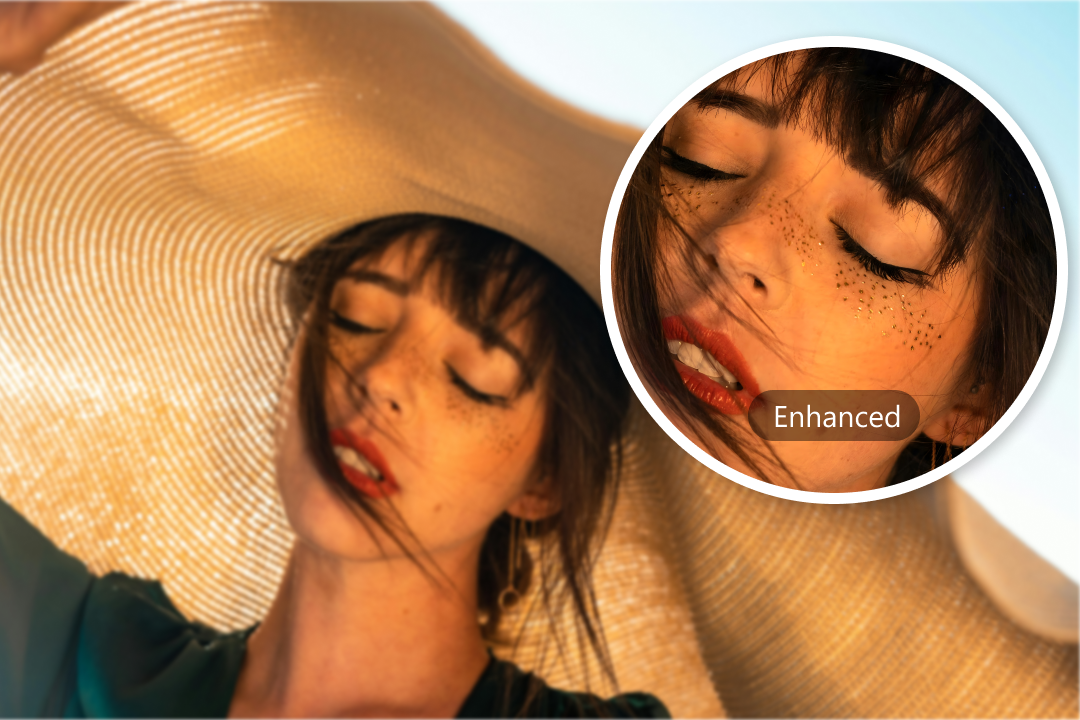

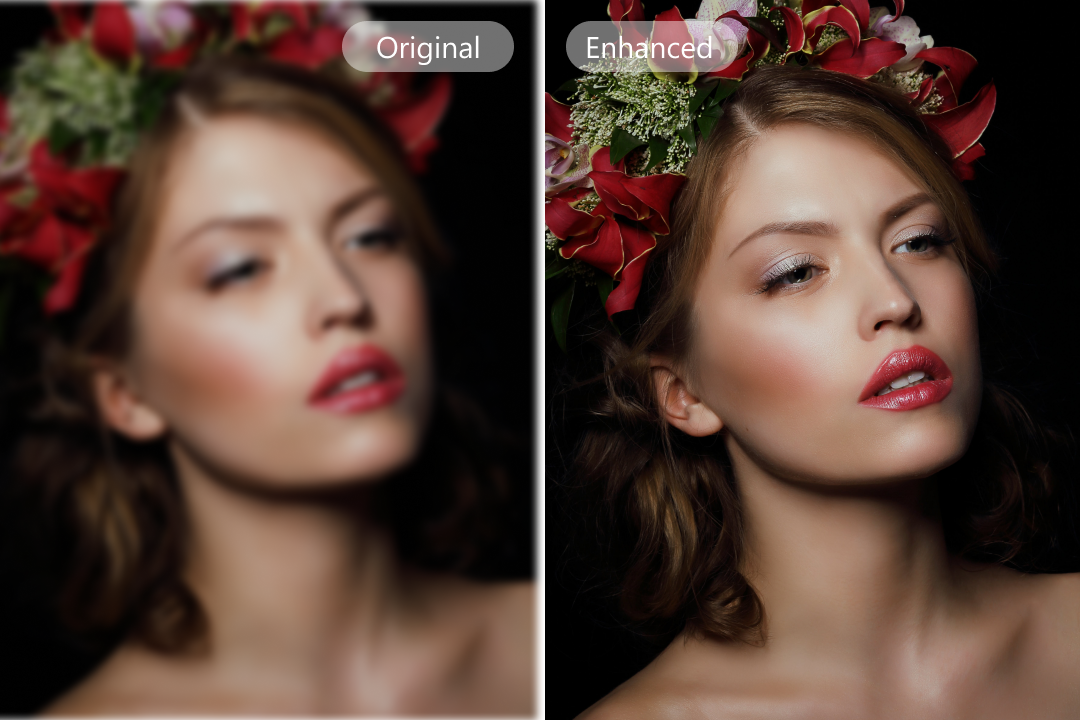
Nero AI Face Enhancer is an online AI tool that improves facial clarity and detail in photos. It can enhance blurry, pixelated, or low-resolution faces in portraits, selfies, profile pictures, family photos, and group photos.
Yes. Nero AI Face Enhancer can sharpen blurry or pixelated faces and improve facial clarity and detail. It works best when the original photo still contains visible facial information for the AI to enhance.
Yes. Nero AI Face Enhancer can enhance multiple faces in a group photo. It detects faces individually and improves facial clarity and sharpness, including smaller faces farther from the camera.
Portraits, selfies, profile pictures, family photos, and group photos with visible faces are good candidates for face enhancement. For better results, use an image where the face is recognizable and still contains visible facial details. Extremely small, heavily blurred, or heavily obstructed faces may produce less predictable results.
Nero AI Face Enhancer focuses on improving facial clarity, sharpness, and detail while keeping the result natural-looking. The final result depends on the quality of the original photo, and you can preview the enhanced image before downloading it.
Yes. New users receive 10 free trial Nero Credits to try Nero AI Face Enhancer. Face enhancement uses Nero Credits, and you can purchase additional Credits or choose a paid plan after using your free Credits.
You can also earn free Nero Credits through the Nero AI Reward Center.
Be part of our Club: The free Nero newsletter informs you about the latest Nero products and exclusive offers.
'%20fill='%23FDB03B'/%3e%3c/svg%3e)